
Table of Contents
- 6.1 Advisor Hub
- 6.2 Spectra
- 6.3 DDMF (Direct Debit Mandate Form)
- 6.4 Residency Eligibility Criteria
- 6.5 Death of a Client
- 6.6 Servicing Amendments
- 6.7 Underwriting Outcomes
- 6.8 Genistar Vitality Academy
- 6.9 Start dates, payment dates and cover dates
- 7.0 Resources
6.1 Advisor Hub
Panel
Genistar representatives will need to have their IBA approved by the compliance team and complete Life insurance competency located in their Training section on Genistar Online. Please note, if this competency is not completed and passed, then the representative cannot write any business for their clients.
Process: How to get Vitality login details as a new representative?
- After the representative has completed and passed Life insurance competency initially, their details are sent to Vitality.
- Vitality will then use the details to set up their account. Please note that this can take 3 – 5 working days, with an additional 24 – 48hrs for permission settings to be amended. This is because it is a manual process.
- Please note, we recommend representatives do not write any business in Vitality Advisor hub during this period as there is a risk of them fully submitting applications.
- Representatives should be supervised by their upline during this period for support, guidance and ensure no application is fully submitted. FSC will need to complete their review and will submit it fully on their end.
- The email sent from Vitality to the representatives does have a link with an expiration time of about 24-48 hours; it is advised that the account is activated within that time frame to avoid requesting a new link.
Process: How to reset Vitality Advisor hub password?
- When Vitality has setup the Advisor hub login, you will receive an email instructing you to complete the registration. This will expire in 30 minutes. If missed, please follow Step.
- Please make sure to use your registered email address, which would be the email that you used for your Genistar IBA (Independent Business Application).
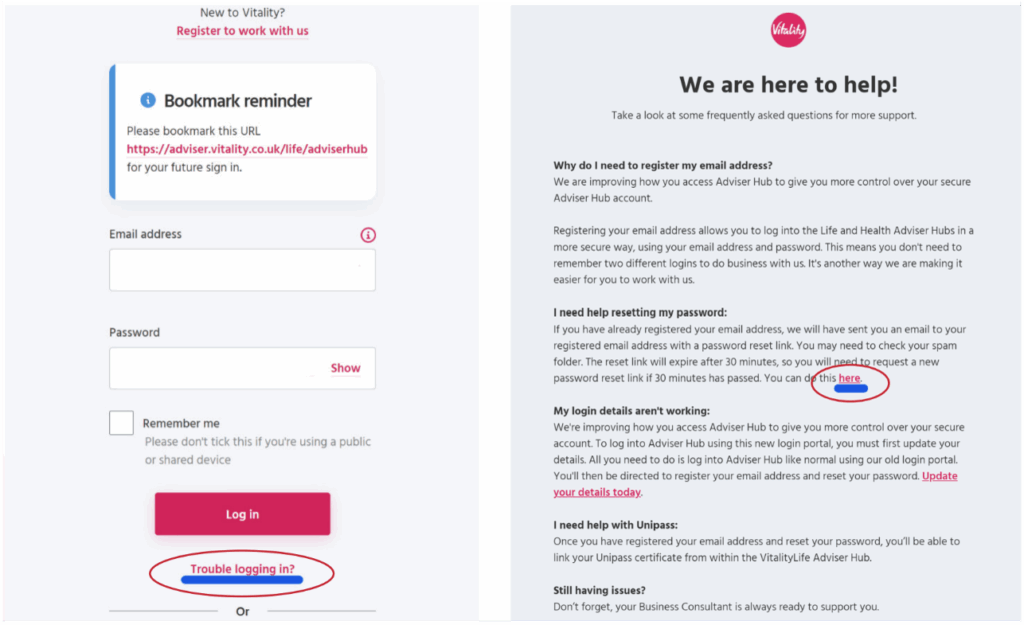
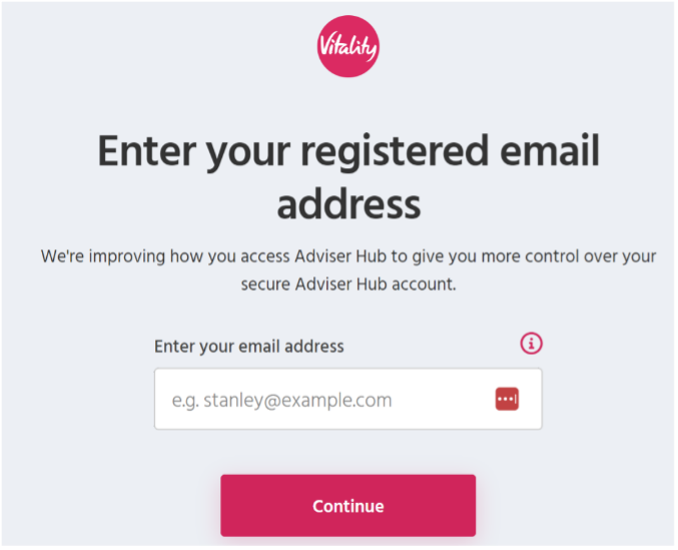
- Once you click on the link labelled “here”, you will be directed to another page to enter your registered email address.
- You will then receive the email below and will have a 30-minute window to reset your password and set up a new password.
*Please note: if you did not receive it, please check your junk/spam inbox.
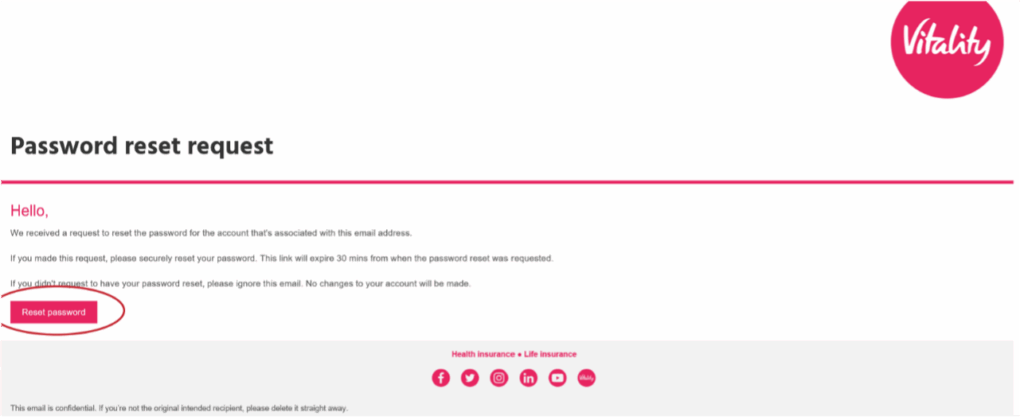
- Please click on the “Reset password” button in the email. You will then be directed to enter the new password and confirm.
- Once this is complete, you can then login using your new password.
- If you are having trouble resetting, please contact Vitality 0345 0510044 – Option 1, they will be able to assist
Rules: Can
- Licensed representatives receive their own personal Vitality login details to access Vitality Advisor hub.
- If a representative is EVP or higher level like SVP, NSD and SNSD, they will also have an agency page where they are able to select themselves as business writers and representatives in their baseshop.
- Representatives can reset their password should they need to. Please fllow the steps to reset passwords.
Rules: Can’t
- Vitality Advisor hub login will not be issued if the representative has not had their IBA approved by the Compliance team and passe Life insurance competency in Genistar online.
- Paneling requests should be made by the Field Support Team, not through direct contact to Vitality.
- To avoid complications such as duplicate accounts, the representative’s EVP should query any paneling/logins with the Field Support team who will then liaise with Vitality’s paneling team.
Re-panel
This is usually for representatives whose Vitality Advisor account was previously set up and their access have been removed due to inactivity or resignation or termination.
Process: How to re-panel representatives?
- Currently, once the representative has completed and passed their Life insurance competency, they should make their EVP aware of it.
- EVP upline will email FSC to get the representative re-paneled in Vitality Advisor hub.
- FSC will get the necessary details and send it to Vitality to action.
- Representative’s full name
- DOB
- Contact number
- Email Address
- EVP name
- Agency code (given to EVP upline)
- Vitality team will re-panel the representatives which can take 3 – 5 working days, with an additional 24 – 48hrs for permission settings to be amended. This is because it is a manual process.
- Please note, we recommend representatives do not write any business in Vitality Advisor hub during this period as there is a risk of them fully submitting applications.
- Representatives should be supervised by their upline during this period for support, guidance and ensure no application is fully submitted. FSC will need to complete their review and will submit it fully on their end.
- The email sent from Vitality to the representatives does have a link with an expiration time of about 24-48 hours; it is advised that the account is activated within that time frame to avoid requesting a new link.
Rules: Can
- Only FSC can request re-paneling for representatives.
- If representatives are moving between agencies (EVP baseshop), EVP will need to contact FSC with details of the representative that will be getting transferred.
- Re-panel applies to all representatives who previously had their Vitality account set up.
Rules: Can’t
- Vitality Advisor hub login will not be issued if the representative has not had their IBA approved by the Compliance team and passe Life insurance competency in Genistar online.
- Paneling requests should be made by the Field Support Team, not through direct contact to Vitality.
- To avoid complications such as duplicate accounts, the representative’s EVP should query any paneling/logins with the Field Support team who will then liaise with Vitality’s paneling team.
6.2 Spectra
Spectra is an underwriting tool. This tool can be accessed from Vitality Advisor hub by clicking on the tab which directs you to a separate platform. Vitality recommends field representatives utilise it to get an indicative term. Please note, spectra logins are set up for those with Genistar allocated email addresses, which are predominantly representatives who are Team Leader level and above.
This helps avoid any potential declines and deferrals and manages the client’s expectations, which could affect the client when getting alternative cover.
Process: How to access Spectra?
- Login to your Vitality Advisor Hub.
- Find the tab with label “Spectra” and click on it.
- You will be directed to a separate platform where you will have to enter Spectra login details.
- If a representative doesn’t have spectra login details, they can inform their EVP upline.
- EVP upline can confirm with FSC whether the representatives have a Genistar email address, if yes, FSC will inform Vitality to get their account set up. If no, then EVP upline can support by using their Spectra account.
Rules: Can
- Representatives who have passed their Life insurance competency and have been allocated Genistar email address can have Spectra login.
- Representatives can use the tool to get an indicative term, should the client(s) have any medical disclosures historical or present.
- Representatives can enter the reference number from the Spectra run on to the application under pre-sale number.
Rules: Can’t
- Spectra access is not provided to those who have passed Life insurance but do not have Genistar email address.
- Representatives or their EVP upline cannot request login to be set up, this must be requested via FSC.
6.3 DDMF (Direct Debit Mandate Form)
Clients can fill out Direct Debit Mandate paper form if they do not want to enter their bank details online. If a client payment card is linked to multiple policies, e.g., paying for a partner, dependent, must fill out the DDM form, and send the form to Vitality.
This form can be found in Vitality’s Literature Library in the Forms and Suitability Library, under the direct debit tab.
The Direct Debit mandate form can also be found in Infohub under Forms > Vitality.
6.4 Residency Eligibility Criteria
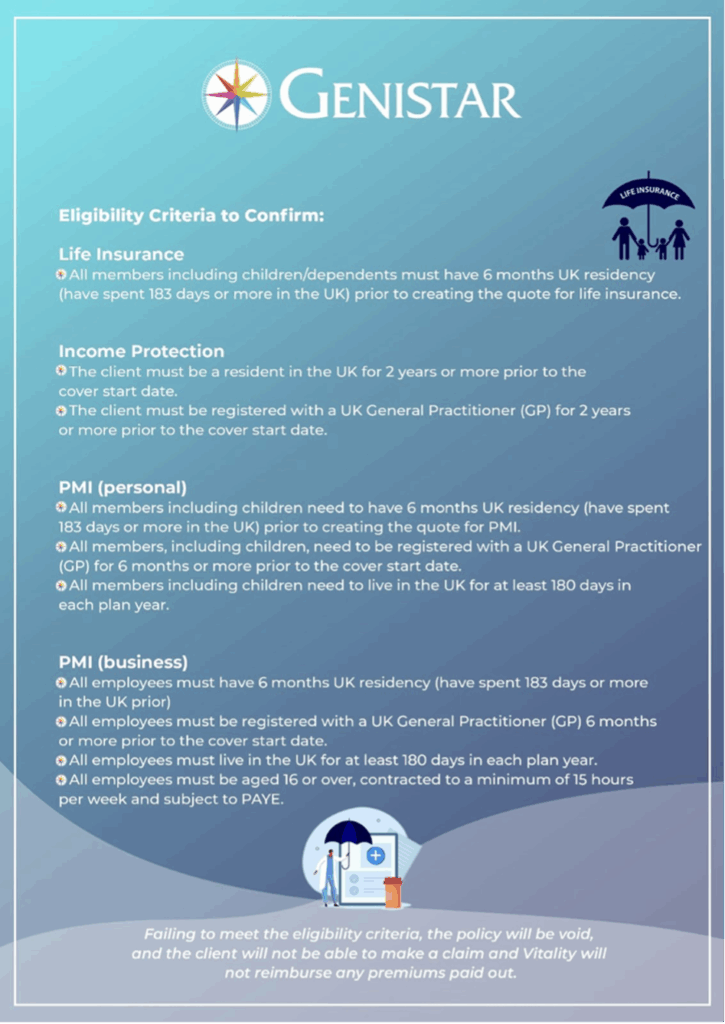
Child Serious Illness Cover
Based on our plan provisions, the adults are able to add Child SIC onto their policy given they (Adult) meet the residency guidelines.
- The only requirements we have is that the adult is in the UK at the time of taking out the plan. The only other thing to mention is the definition of a child, specifically they need to be financially dependent. In the event of a claim the usual rules would apply to claim
- There is still the requirement for them to be UK residents to qualify for a Child Funeral Contribution / Total Permanent Disability claim as per the plan provisions.
6.5 Death of a Client
In the unfortunate event of the death of a client within the three-year clawback phase of the policy, in addition to giving support to the Client’s family, the EVP should contact the VitalityLife and Genistar Compliance team to prevent a clawback being applied to the policy when the premiums stop.
6.6 Servicing Amendments
Clients looking to make changes to an already existing policy can contact their business writer/servicing representative to request a servicing amendment. The process adjusts based around what the client has previously purchased and increases/decreases coverage depending on their current protection needs.
The business writer will sit with the client and go over their needs, once they have done so, they can send it to their EVP who can action it accordingly by contacting Vitality or emailing lifeservquotes@vitality.co.uk
Process: How to action servicing amendment?
- If the client’s servicing rep is a non-EVP, they should sit with the client and fill out the word form. This can be found in Resources library.
Once they have done so, they can send it to their upline EVP who can action it accordingly (Step 2).
However, if EVP is the servicing rep (personal business) of the client then you will need to sit with the client and get it actioned. You do not need to fill out the word document, just the Microsoft form only.
- EVP to call Vitality head office at 0345 601 0072 (quicker option) OR email lifeservquotes@vitality.co.uk and request changes and get a copy of the quote sent.
- Email a copy of the final quote to the client and get the client’s confirmation. EVP can call Vitality to activate the quote.
- EVP’s can then complete the Servicing Amendment form.
- Send a copy of the client’s confirmation email to sa@genistar.net
- FSC will update the internal database for auditing purposes
Rules: Can
- Only EVP and above levels can request servicing amendments with Vitality.
- Any non-EVP levels must fill out the necessary document and send it to their upline EVP to action.
- If client would like to increase or decrease existing policy, servicing representatives must follow the servicing amendment process.
Rules: Can’t
- Serviced policies do not need to be resubmitted into Genistar Online. Servicing amendments are logged internally, using the SA forms and client confirmations.
- If clients need to get a new policy instead, they cannot follow servicing amendment process. This will need to be created as a new application via new client review actioned by their servicing representatives.
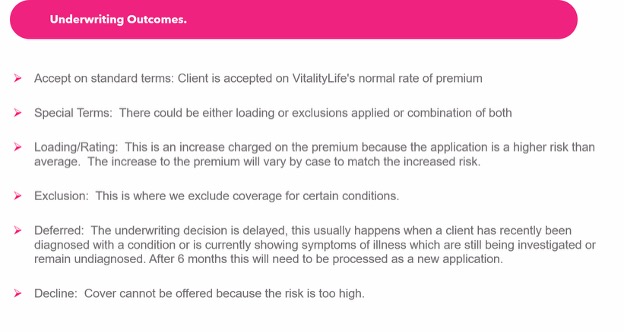
6.7 Underwriting Outcomes
6.8 Genistar Vitality Academy
How to get signed up and access Genistar Vitality Academy?
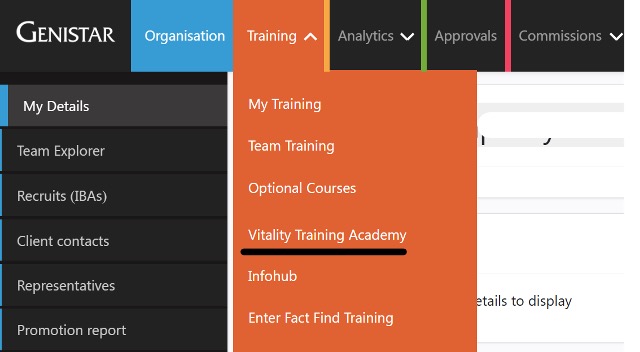
- When the rep’s IBA is approved by Compliance, HR team will manually register the rep to bridge app.
- Rep will receive an email with their details to login to the bridge app.
- They can access using this link https://genistar-vitality.bridgeapp.com or login to Genistar online account and access it via Training tab.
6.9 Start dates, payment dates and cover dates
Activation Date
- The client agrees to the terms and payment of the policy
- Agree and set the start date
- Agree and set the preferred payment date
- The Direct Debit is set up
- This can take around 8 days with the bank
Start Date (Cover Begins)
- This is when cover actually starts
- The policy becomes active from this date
- The first month of cover begins here
Prefered Payment Date
- This is when the payment is taken
- It pays for the cover period
- It follows the client’s chosen date (e.g. 1st of the month)
Quick glance
The start date is when cover begins, and the payment date is when the client pays for that cover. Payment
Called preferred payment date as if lands on weekends or bank holidays may adjust to the next working day
Simple Example
- Plan starts today (e.g. 23rd June)
- Cover runs monthly from 23rd to 22nd
- Client wants payments on the 28th
First payment will be taken on 1st July (to allow time to set up the Direct Debit)
After that, payments are taken on the 28th of each month
Each payment covers the period 23rd to 22nd
In straight forward terms:
Cover runs 23rd–22nd each month, and payments follow on the chosen date once the Direct Debit is set up.
If the client does not log onto the member zone or achieve 100 points in first 30 days, will receive a welcome call to support them getting engaged.
If the client is a vitality plus member they will be emailed a code to receive their health check for free in the first year.
Clients can call the team for support Mon – Fri 8am-7pm or Saturdays 9am – 1pm on 0345 602 3523
7.0 Resources
| Topics | Link |
| Personal Protection Literature Library | https://adviser.vitality.co.uk/resources/literature/personal-life-insurance/ |
| Online Tools | https://adviser.vitality.co.uk/resources/tools/ |
| BMI calculator | https://adviser.vitality.co.uk/bmi-calculator/ |
| Conditions covered tool | https://www.vitalityconditionscovered.co.uk/?_ga=2.261711117.1865681368.1685963173-1925610559.1682506284 |
| Risk Calculator | https://vitalityriskcalculator.co.uk/?_ga=2.26844733.1865681368.1685963173-1925610559.1682506284 |
| Genistar Vitality Academy | https://genistar-vitality.bridgeapp.com/login?external=1&state=-Hs477JzEALEGUFTU6SbOzgSps_JRH6YZkWZw2LVWUc |
Key contacts
| Team | Contact number | QUERY | |
| New Business | centrallondon.genistar@vitality.co.uk | 0345 601 0072 | Use when for updates, plan documents. Team Head office prioritises this email inbox. |
| Head Office | central.fcm@vitality.co.uk | 0345 601 0072 | Use to reply to updates/further information requested. |
| Commissions team | vitalitylife_commissions@vitality.co.uk | 0345 601 0072 | Commission related |
| technical support team | technical_support@vitality.co.uk | 0345 601 0072 | Use for when reporting technical issue regarding Vitality Advisor hub. Please use the form and provide as much detail of the issue. |
| Complaints | LifeComplaints@vitality.co.uk | ||
| Claims | lifeclaims@vitality.co.uk | 0345 601 0072 | Use to contact claims team |
| Credit control | vitalitylife_creditcontrol@vitality.co.uk | 0345 601 0072 | Use to contact Credit control |
| Rewards and Partners | 03456023523 | Welcome team |
| QUERY | Call Options |
| Advisor or broker | 1 * |
| Existing member | 2 |
| Vitality Health Plan | 3 |
| Brand New Life Plan | 4 |
| *New Quote or new business | Option 1 and 1 |
| *Existing plan | Option 1 and 2 |
| *Info slips /commissions | Option 1 and 3 |
| *Underwriting questions | Option 1 and 4 |
| *Claims | Option 1 and 5 |
| *Leaving Vitality (client or advisor) | Option 1 and 6 |
| *Technical support | Option 1 and 7 |
| *Anything else | Option 1 and 8 |
Version control
| Section | Who | Date |
| Start dates, payment dates and cover dates | Tapashya Sunuwar | 24.06.2026 |